Examples
Generic, synthetic examples for the reusable core library — source on the left logic, rendered output below.
example_main
Minimal pie chart, exported to PNG and JPEG.
make example_main && ./example_main
# or
cmake --build build --target example_main && ./build/example_main
// SPDX-License-Identifier: MIT
// Copyright (c) InsightDock contributors

#include "insightdock/charts.h"
#include <iostream>

int main() {
  insightdock::charts::PieChart chart;
  chart.options().width = 600;
  chart.options().height = 600;
  chart.options().background = insightdock::charts::Color::white();
  chart.options().title = "Sample Pie";

  chart.add_slice("Revenue", 100.0);
  chart.add_slice("Expenses", 60.0);
  chart.add_slice("Profit", 40.0);

  insightdock::charts::ImageBuffer img = insightdock::charts::ChartExporter::render(chart);
  std::cout << "Chart: " << img.width() << " x " << img.height()
            << " pixels, " << img.data().size() << " bytes\n";
  std::cout << "Slices: " << chart.slice_count() << '\n';

  if (insightdock::charts::ChartExporter::save(chart, "chart_output.png"))
    std::cout << "Wrote chart_output.png\n";

  insightdock::charts::ExportOptions jpg_opts;
  jpg_opts.format = insightdock::charts::OutputFormat::Jpeg;
  jpg_opts.jpeg_quality = 90;
  if (insightdock::charts::ChartExporter::save(chart, "chart_output.jpg", jpg_opts))
    std::cout << "Wrote chart_output.jpg\n";

  return 0;
}
bar_line_example
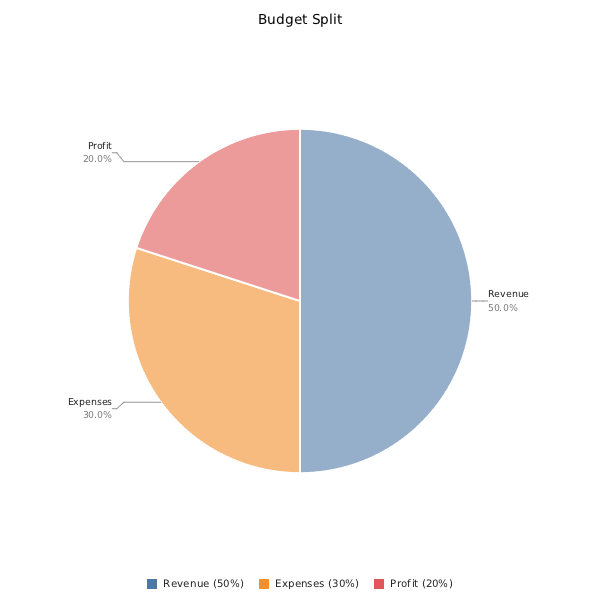
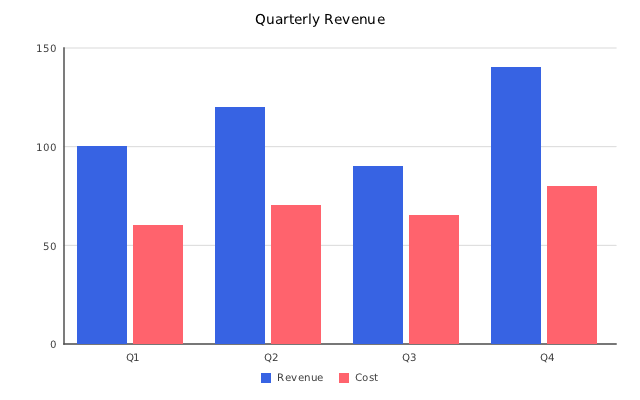
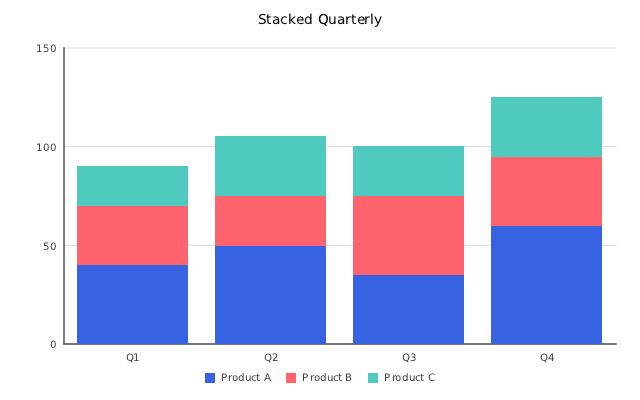
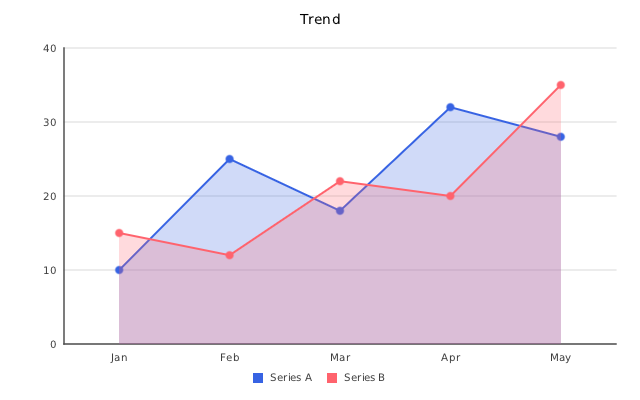
Grouped bar, stacked bar, line (with area fill), and pie in one run.
make bar_line_example && ./bar_line_example
#include "insightdock/charts.h"

// SPDX-License-Identifier: MIT
// Copyright (c) InsightDock contributors


#include <iostream>

int main() {
  // Grouped bar chart
  insightdock::charts::BarChart bar;
  bar.options().width = 640;
  bar.options().height = 400;
  bar.options().title = "Quarterly Revenue";
  bar.set_categories({"Q1", "Q2", "Q3", "Q4"});
  bar.add_series("Revenue", {100, 120, 90, 140});
  bar.add_series("Cost", {60, 70, 65, 80});
  bar.set_mode(insightdock::charts::BarMode::Grouped);
  bar.cartesian_options().y_axis_label = "Amount";

  insightdock::charts::ImageBuffer bar_img = bar.render();
  if (insightdock::charts::write_png("bar_grouped.png", bar_img))
    std::cout << "Wrote bar_grouped.png\n";

  // Stacked bar chart
  insightdock::charts::BarChart stacked;
  stacked.options().width = 640;
  stacked.options().height = 400;
  stacked.options().title = "Stacked Quarterly";
  stacked.set_categories({"Q1", "Q2", "Q3", "Q4"});
  stacked.add_series("Product A", {40, 50, 35, 60});
  stacked.add_series("Product B", {30, 25, 40, 35});
  stacked.add_series("Product C", {20, 30, 25, 30});
  stacked.set_mode(insightdock::charts::BarMode::Stacked);

  insightdock::charts::ImageBuffer stacked_img = stacked.render();
  if (insightdock::charts::write_png("bar_stacked.png", stacked_img))
    std::cout << "Wrote bar_stacked.png\n";

  // Line chart
  insightdock::charts::LineChart line;
  line.options().width = 640;
  line.options().height = 400;
  line.options().title = "Trend";
  line.set_categories({"Jan", "Feb", "Mar", "Apr", "May"});
  line.add_series("Series A", {10, 25, 18, 32, 28});
  line.add_series("Series B", {15, 12, 22, 20, 35});
  line.line_options().fill_area = true;

  insightdock::charts::ImageBuffer line_img = line.render();
  if (insightdock::charts::write_png("line_chart.png", line_img))
    std::cout << "Wrote line_chart.png\n";

  // Pie chart
  insightdock::charts::PieChart pie;
  pie.options().width = 600;
  pie.options().height = 600;
  pie.options().background = insightdock::charts::Color::white();
  pie.options().title = "Budget Split";
  insightdock::charts::PieOptions po;
  po.radius = 220.0;
  pie.set_pie_options(po);
  pie.add_slice("Revenue", 100.0);
  pie.add_slice("Expenses", 60.0);
  pie.add_slice("Profit", 40.0);

  insightdock::charts::ImageBuffer pie_img = pie.render();
  if (insightdock::charts::write_png("pie_chart.png", pie_img))
    std::cout << "Wrote pie_chart.png\n";

  return 0;
}
| Grouped bar | Stacked bar |
|---|---|
 |
 |
combo_chart_example
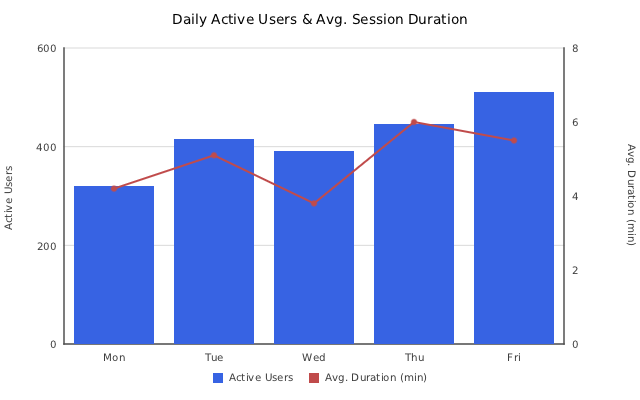
Bar series on the left axis, line series on an independent right axis (different units/magnitude).
cmake --build build --target combo_chart_example && ./build/combo_chart_example
// SPDX-License-Identifier: MIT
// Copyright (c) InsightDock contributors

#include "insightdock/charts.h"

#include <iostream>

int main() {
  using namespace insightdock::charts;

  // Bars use the left axis (Active Users); the line uses an independent
  // right axis (Avg. Duration) since the two series have different units
  // and magnitude.
  ComboChart combo;
  combo.options().width = 640;
  combo.options().height = 400;
  combo.options().title = "Daily Active Users & Avg. Session Duration";
  combo.cartesian_options().y_axis_label = "Active Users";
  combo.cartesian_options().y2_axis_label = "Avg. Duration (min)";
  combo.set_categories({"Mon", "Tue", "Wed", "Thu", "Fri"});
  combo.add_bar_series("Active Users", {320, 415, 390, 445, 510});
  combo.add_line_series("Avg. Duration (min)", {4.2, 5.1, 3.8, 6.0, 5.5}, Color::rgb(192, 75, 75),
                        /*secondary_axis=*/true);

  ImageBuffer combo_img = combo.render();
  if (write_png("combo_chart.png", combo_img))
    std::cout << "Wrote combo_chart.png\n";

  return 0;
}
time_series_line_example
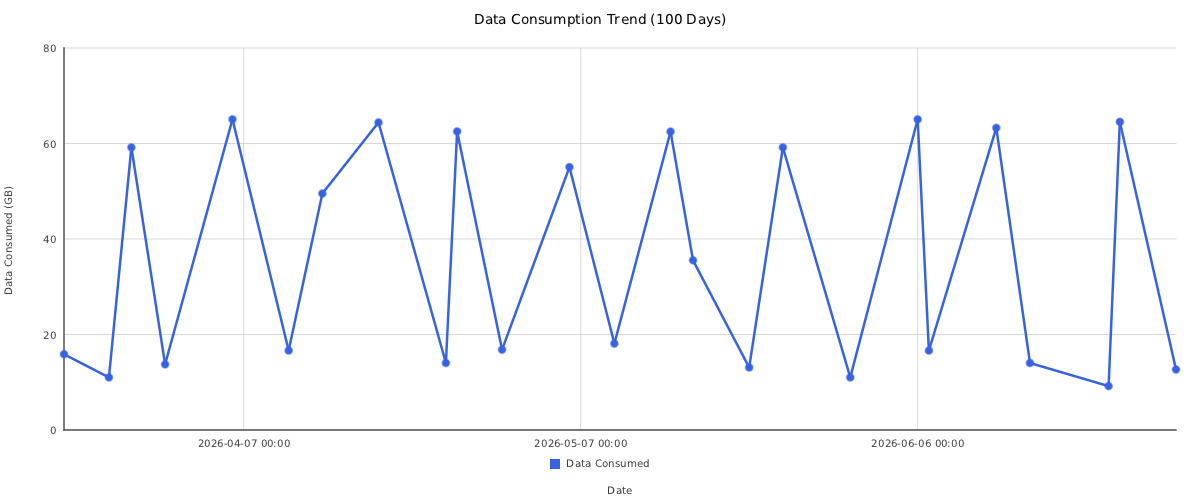
Dense time-series LineChart with 100 daily data points: decimates to 25 representative points using LTTB and uses max_x_labels = 12 to cap the x-axis to ~12 readable date labels regardless of chart width. For equivalent control over the y-axis, use CartesianOptions::min_y_labels / max_y_labels (e.g. set both to 12 to request ~12 evenly-spaced y-axis ticks).
cmake --build build --target time_series_line_example && ./build/time_series_line_example
// SPDX-License-Identifier: MIT
// Copyright (c) InsightDock contributors
//
// Demonstrates a dense time-series LineChart with a real continuous DateTime x-axis:
//   - 100 daily data points (as Unix timestamps) decimated to 25 via LTTB
//   - CartesianOptions::x_scale_type = ScaleType::DateTime positions each point by its
//     actual timestamp (via set_x_values) rather than an evenly-spaced category slot —
//     the axis ticks/labels are generated and formatted automatically from the domain,
//     not hand-formatted date strings
//   - max_x_labels caps the x-axis to ~12 readable date labels
//   - custom y-axis title (data already pre-scaled to GB by the caller)

#include "insightdock/charts.h"
#include "insightdock/decimate.h"

#include <cstdio>
#include <string>
#include <vector>

int main(int argc, char **argv) {
  using namespace insightdock::charts;

  std::string out = (argc > 1) ? argv[1] : "time_series_line.png";

  // 100 daily timestamps (Unix seconds, starting 2026-03-22 UTC) and corresponding
  // data-consumed values in GB.
  double const day = 86400.0;
  double const start_ts = 1774137600.0; // 2026-03-22 00:00:00 UTC
  std::vector<double> timestamps;
  timestamps.reserve(100);
  for (int i = 0; i < 100; ++i)
    timestamps.push_back(start_ts + static_cast<double>(i) * day);

  std::vector<double> data_gb = {
      15.87, 22.43, 16.27, 44.91, 11.01, 50.26, 59.18, 14.17, 57.10, 13.75, 48.10, 54.36, 39.50,
      13.09, 43.36, 65.06, 53.91, 55.09, 31.87, 56.41, 16.64, 64.69, 14.76, 49.52, 24.28, 21.49,
      47.77, 51.40, 64.41, 35.54, 50.35, 24.28, 55.12, 40.12, 14.03, 62.53, 44.83, 32.64, 51.42,
      16.82, 41.96, 25.19, 64.41, 11.22, 32.64, 55.06, 24.28, 38.47, 59.64, 18.10, 49.46, 42.96,
      27.08, 51.42, 62.49, 14.76, 35.54, 41.96, 58.25, 28.93, 54.23, 13.09, 43.36, 57.12, 59.18,
      31.87, 53.91, 16.27, 22.43, 39.50, 11.01, 48.10, 14.17, 50.26, 13.75, 55.09, 65.06, 16.64,
      44.91, 44.36, 36.01, 19.62, 52.57, 63.28, 21.49, 38.42, 14.03, 64.69, 49.52, 32.64, 44.83,
      16.82, 51.42, 9.19,  64.54, 41.83, 42.41, 44.13, 41.73, 12.67,
  };

  // Decimate 100 → 25 points with LTTB so the chart stays readable.
  // lttb_decimate_indexed returns the downsampled values and the original
  // index of each kept point, letting us slice the timestamp list to match.
  auto [dec_values, dec_indices] = lttb_decimate_indexed(data_gb, 25);

  std::vector<double> dec_timestamps;
  dec_timestamps.reserve(dec_indices.size());
  for (std::size_t i : dec_indices)
    dec_timestamps.push_back(timestamps[i]);

  LineChart chart;
  chart.options().width = 1200;
  chart.options().height = 500;
  chart.options().title = "Data Consumption Trend (100 Days)";
  chart.options().legend.position = LegendOptions::Position::Bottom;

  chart.set_x_values(dec_timestamps);
  chart.add_series("Data Consumed", dec_values);

  chart.cartesian_options().x_axis_label = "Date";
  chart.cartesian_options().y_axis_label = "Data Consumed (GB)";
  chart.cartesian_options().x_scale_type = ScaleType::DateTime;
  chart.cartesian_options().max_x_labels = 12;
  chart.cartesian_options().begin_at_zero = true;

  chart.line_options().show_points = true;
  chart.line_options().point_radius = 4.0f;
  chart.line_options().line_width = 2.5f;

  if (!ChartExporter::save(chart, out)) {
    std::fprintf(stderr, "save failed: %s\n", out.c_str());
    return 1;
  }
  std::printf("saved %zu points → %s\n", dec_values.size(), out.c_str());
  return 0;
}
scatter_bubble_example
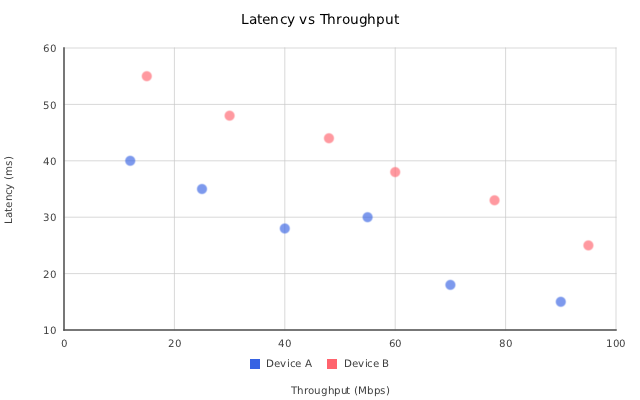
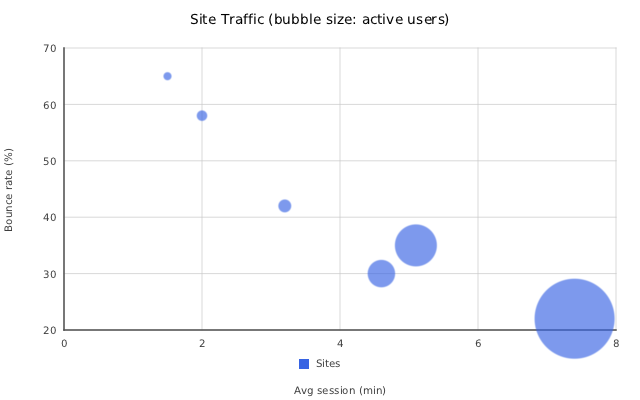
Plain scatter (continuous numeric x/y, two series) and a bubble chart (third value drives marker radius).
cmake --build build --target scatter_bubble_example && ./build/scatter_bubble_example
// SPDX-License-Identifier: MIT
// Copyright (c) InsightDock contributors

#include "insightdock/charts.h"

#include <iostream>

int main() {
  using namespace insightdock::charts;

  // Plain scatter — continuous numeric x/y, no category alignment needed.
  ScatterChart scatter;
  scatter.options().width = 640;
  scatter.options().height = 400;
  scatter.options().title = "Latency vs Throughput";
  scatter.scatter_options().x_axis_label = "Throughput (Mbps)";
  scatter.scatter_options().y_axis_label = "Latency (ms)";
  scatter.add_series("Device A", {{12, 40}, {25, 35}, {40, 28}, {55, 30}, {70, 18}, {90, 15}});
  scatter.add_series("Device B", {{15, 55}, {30, 48}, {48, 44}, {60, 38}, {78, 33}, {95, 25}});

  ImageBuffer scatter_img = scatter.render();
  if (write_png("scatter_chart.png", scatter_img))
    std::cout << "Wrote scatter_chart.png\n";

  // Bubble variant — third value (radius) drives marker size.
  ScatterChart bubble;
  bubble.options().width = 640;
  bubble.options().height = 400;
  bubble.options().title = "Site Traffic (bubble size: active users)";
  bubble.scatter_options().x_axis_label = "Avg session (min)";
  bubble.scatter_options().y_axis_label = "Bounce rate (%)";
  bubble.add_series("Sites", {
                                 {3.2, 42, 120},
                                 {5.1, 35, 480},
                                 {2.0, 58, 90},
                                 {7.4, 22, 950},
                                 {4.6, 30, 300},
                                 {1.5, 65, 60},
                             });

  ImageBuffer bubble_img = bubble.render();
  if (write_png("bubble_chart.png", bubble_img))
    std::cout << "Wrote bubble_chart.png\n";

  return 0;
}
| Scatter | Bubble |
|---|---|
 |
 |
podofo_report_example
Requires PoDoFo — see Getting started. Produces a multi-page PDF report with embedded charts (chart_report.pdf) and a vector-pie PDF (pie_vector.pdf); both are PDF output, so there's no PNG preview here.
cmake -B build-podofo \
  -DINSIGHTDOCK_WITH_PODOFO=ON \
  -DINSIGHTDOCK_PODOFO_DIR=/path/to/podofo
cmake --build build-podofo --target podofo_report_example
export LD_LIBRARY_PATH="$(pwd)/build-podofo/podofo/target:${LD_LIBRARY_PATH}"
./build-podofo/podofo_report_example
// SPDX-License-Identifier: MIT
// Copyright (c) InsightDock contributors

#include "insightdock/charts.h"
#include "insightdock/pdf/podofo.h"

#include <podofo/podofo.h>
#include <iostream>

int main() {
  using namespace PoDoFo;

  PdfMemDocument doc;
  PdfPainter painter;
  auto& page = doc.GetPages().CreatePage(PdfPageSize::A4);
  painter.SetCanvas(page);

  insightdock::charts::ExportOptions raster_opts;
  raster_opts.supersample = 2;

  insightdock::charts::ExportOptions vector_opts;
  vector_opts.pdf_backend = insightdock::charts::PdfBackend::Vector;

  insightdock::charts::BarChart bar;
  bar.options().width = 480;
  bar.options().height = 280;
  bar.options().title = "Sales";
  bar.set_categories({"A", "B", "C"});
  bar.add_series("2024", {30, 45, 60});
  bar.add_series("2025", {40, 50, 55});
  insightdock::charts::ChartExporter::draw_pdf(doc, painter, bar, 72, 500, 220, 130, vector_opts);

  insightdock::charts::LineChart line;
  line.options().width = 480;
  line.options().height = 280;
  line.set_categories({"W1", "W2", "W3", "W4"});
  line.add_series("Trend", {5, 12, 8, 15});
  insightdock::charts::ChartExporter::draw_pdf(doc, painter, line, 320, 500, 220, 130, vector_opts);

  insightdock::charts::PieChart pie;
  pie.options().width = 280;
  pie.options().height = 280;
  pie.options().background = insightdock::charts::Color::white();
  pie.add_slice("A", 50);
  pie.add_slice("B", 30);
  pie.add_slice("C", 20);
  insightdock::charts::ChartExporter::draw_pdf(doc, painter, pie, 72, 200, 130, 130, vector_opts);

  painter.FinishDrawing();
  doc.Save("chart_report.pdf");
  std::cout << "Wrote chart_report.pdf (vector PDF)\n";

  if (insightdock::charts::ChartExporter::save(pie, "pie_vector.pdf", vector_opts))
    std::cout << "Wrote pie_vector.pdf (standalone vector pie via ChartExporter::save)\n";

  // --- PdfReportBuilder-driven multi-page report ---
  {
    using namespace insightdock::charts;

    PdfMemDocument report_doc;
    PdfPainter report_painter;
    auto &page1 = report_doc.GetPages().CreatePage(PdfPageSize::A4);
    report_painter.SetCanvas(page1);

    PdfFont &font = report_doc.GetFonts().GetStandard14Font(PdfStandard14FontType::Helvetica);
    PdfFont &font_bold =
        report_doc.GetFonts().GetStandard14Font(PdfStandard14FontType::HelveticaBold);
    report_painter.TextState.SetFont(font, 10);

    pdf::PdfReportBuilder builder(report_doc, report_painter, font, font_bold);
    builder.draw_header_bar("Quarterly Chart Report");

    builder.section_title("Revenue Overview");

    ExportOptions raster_opts2;
    raster_opts2.supersample = 2;
    ExportOptions vector_opts2;
    vector_opts2.pdf_backend = PdfBackend::Vector;

    BarChart bar2;
    bar2.options().width = 480;
    bar2.options().height = 280;
    bar2.options().title = "Quarterly Sales";
    bar2.set_categories({"Q1", "Q2", "Q3", "Q4"});
    bar2.add_series("2024", {30, 45, 60, 50});
    bar2.add_series("2025", {40, 50, 55, 65});
    builder.draw_chart_flow(pdf::PdfPageLayout::margin_l_mm, builder.content_width_mm(), 90, bar2,
                            "Quarterly Sales by Year", raster_opts2);

    LineChart line2;
    line2.options().width = 480;
    line2.options().height = 280;
    line2.set_categories({"W1", "W2", "W3", "W4"});
    line2.add_series("Trend", {5, 12, 8, 15});
    builder.draw_chart_flow(pdf::PdfPageLayout::margin_l_mm, builder.content_width_mm(), 90, line2,
                            "Weekly Trend", raster_opts2);

    builder.section_title("Distribution");

    PieChart pie2;
    pie2.options().width = 280;
    pie2.options().height = 280;
    pie2.options().background = Color::white();
    pie2.add_slice("A", 50);
    pie2.add_slice("B", 30);
    pie2.add_slice("C", 20);
    builder.draw_chart_flow(pdf::PdfPageLayout::margin_l_mm, 90, 90, pie2, "Category Split",
                            vector_opts2);

    PieChart pie3;
    pie3.options().width = 280;
    pie3.options().height = 280;
    pie3.options().background = Color::white();
    pie3.add_slice("X", 70);
    pie3.add_slice("Y", 30);
    builder.draw_chart_flow(pdf::PdfPageLayout::margin_l_mm, 90, 90, pie3, "Region Split",
                            vector_opts2);

    builder.draw_footers("demo-user", "Generated by podofo_report_example");
    report_doc.Save("report_builder_example.pdf");
    std::cout << "Wrote report_builder_example.pdf (multi-page PdfReportBuilder demo)\n";
  }

  return 0;
}