Pie chart
PieChart (insightdock/pie_chart.h) renders labeled slices with a legend, Tableau-10 or
Chart.js palette, and native vector output for both SVG and PDF, not just raster.
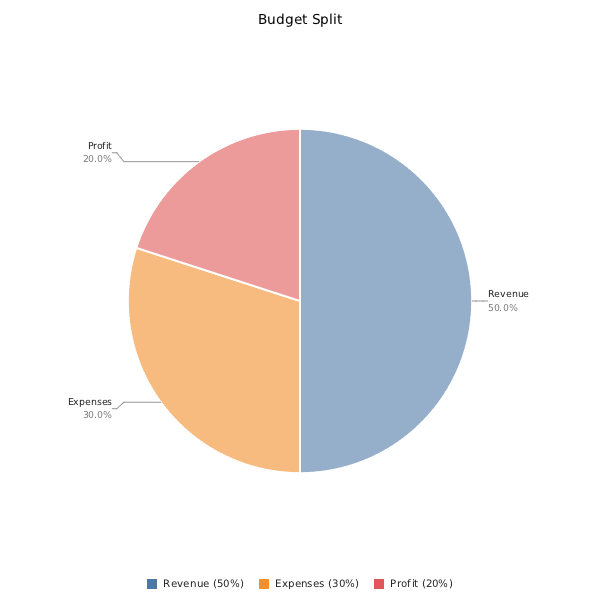
Minimal example
#include "insightdock/charts.h"

using namespace insightdock::charts;

PieChart pie;
pie.add_slice("Revenue", 100.0);
pie.add_slice("Expenses", 60.0);
pie.add_slice("Profit", 40.0);
ChartExporter::save(pie, "pie.png");
Slice values don't need to sum to 100 — percentages are computed from the total automatically. Negative and nonfinite values are stored as zero. Large finite values are normalized before summing, so their proportions remain valid even when their unscaled sum would overflow.
Adding slices
pie.add_slice("Online", 72);              // auto color from PieOptions::palette
pie.add_slice("Offline", 28, Color::rgb(200, 60, 60)); // explicit color
PieOptions
Set via pie.set_pie_options(opts) or mutate in place through a copy — there is no mutable
accessor, since options are applied as a batch:
PieOptions opts;
opts.radius = 220.0;
opts.legend_position = PieLegendPosition::Right;
pie.set_pie_options(opts);
| Option | Default | Purpose |
|---|---|---|
center_x / center_y |
0 |
Pie center in pixels; both 0 auto-center in the area remaining after title and legend layout. |
radius |
0.0 |
Pie radius in pixels; 0 = auto-fit, reserving margin for title, legend and callout labels. |
gap_degrees |
0.0 |
Angular gap between slices, in degrees. |
skip_zero |
true |
Omit slices with value ≤ 0. |
palette |
PaletteKind::Tableau10 |
Color cycle used for slices added without an explicit color. |
show_labels |
true |
Draw slice labels on the chart. |
show_percentage |
true |
Include the percentage in each label. |
show_legend |
true |
Draw a legend. |
legend_position |
PieLegendPosition::Bottom |
Bottom or Right. |
fill_opacity |
0.6 |
Multiplies each slice color's alpha, clamped to 0–1. |
stroke_color |
white | Outline color between slices. |
stroke_width |
2.0 |
Slice outline width in pixels. |
label_color |
rgb(34,34,34) |
Label text color. |
label_font_size |
11.0 |
Label font size in pixels. |
inner_radius_ratio |
0.0 |
Doughnut cutout, as a fraction of radius, [0, 1). 0 = plain pie. Drawn in raster, SVG and PDF output (the hole is painted in the chart background color). |
data_labels |
disabled | DataLabelOptions — an in-slice value/percentage label at radius*0.65 along each slice's midpoint, distinct from the external leader-line label above. |
Doughnut chart
PieOptions opts = pie.pie_options();
opts.inner_radius_ratio = 0.55;
opts.show_labels = false;              // avoid the external label competing with the in-slice one
opts.data_labels.enabled = true;
opts.data_labels.color = Color::white();
opts.data_labels.format = TickFormat::Percent;
pie.set_pie_options(opts);
The cutout assumes a solid background color (already the only backdrop this library supports) —
it's drawn by filling a circle in options().background over the slice geometry, not a true hole.
Multi-line labels
Slice labels may contain \n for manual line breaks (long MAC addresses, device names, etc.).
Words and long tokens wrap using the chart's font measurements, with breaks only between UTF-8
code points. Labels have no fixed byte-length truncation. Empty lines are preserved. This wrapping
is shared by PNG, SVG and PDF chart exports; it does not provide grapheme segmentation or shaping.
Each label and its optional percentage form a measured block. Blocks are ordered vertically
in columns outside the pie and moved apart to avoid overlap. Leader lines exit horizontally
before connecting to the columns, keeping them outside the circle. The title and legend have
reserved areas, and the percentage sits below its label.
Automatic radii reserve measured horizontal space for the callout columns. Explicit center/radius
options keep their requested geometry when it fits the canvas; labels must fit the remaining space.
If a column is too crowded, larger slices keep their callouts first, with input order breaking ties.
A block that cannot fit vertically or horizontally is omitted in full, including its leader and
percentage. Slices remain visible, and legend overflow follows its separate +N more policy.
Increase the canvas size, reduce label_font_size, shorten labels, or disable show_labels and
use the legend when callout coverage matters. This policy is shared by PNG, SVG and PDF exports;
vector font differences described below can still affect the actual text bounds.
pie.add_slice("aa:bb:cc:dd:ee:ff\n(laptop-01)", 40);
Vector output (SVG and PDF)
Pie, bar, line, area and combo charts use the shared DrawTarget pipeline — see
Vector export. Pie exports preserve explicit slice colors and alpha,
gaps, strokes, wrapped callouts, legends and in-slice data labels. SVG sectors use circular arcs;
PDF sectors use vector polygon approximations. Vector text still uses the backend's font, so
glyph appearance and widths can differ from PNG.
ExportOptions opts;
opts.svg_backend = SvgBackend::Vector;   // real <path>/<circle>/<text> SVG
ChartExporter::save(pie, "pie.svg", opts);

opts.format = OutputFormat::PdfVector;
opts.pdf_backend = PdfBackend::Vector;   // native PDF path commands
ChartExporter::save(pie, "pie.pdf", opts);
See Usage guide → Error handling for checking the
ChartResult returned by save(), and PDF reports for embedding a
pie chart inside a multi-page report.
examples/pie_doughnut_example.cc writes PNG and native SVG, plus native PDF in PDF-enabled builds.
The lower-level podofo::draw_pie() and draw_pie_slices() helpers retain their separate PDF
report layout controlled by PieVectorOptions (including overlap resolution and automatic legends).
The draw_chart_vector() overload accepting explicit PieVectorOptions also selects that layout.
Use ChartExporter or draw_chart_vector() without those options for the shared chart layout.
Legend sizing
Bottom legends wrap into centered rows. Right legends reserve measured space up to one third
of the canvas width. Both use at most one third of the canvas height and replace excess entries
with a +N more count. Labels can contain explicit newlines. The chart still renders every slice;
see legend layout and overflow for limits.
Zero-valued automatic center/radius options stay zero after set_pie_options() and are resolved
during rendering, so later canvas size changes are reflected in the layout.