Bar chart
BarChart (insightdock/bar_chart.h) draws vertical bars per category, either grouped
side-by-side or stacked, and inherits the shared axis/grid/legend/title machinery from
CartesianChart — see Concepts if you want the internals.
| Grouped | Stacked |
|---|---|
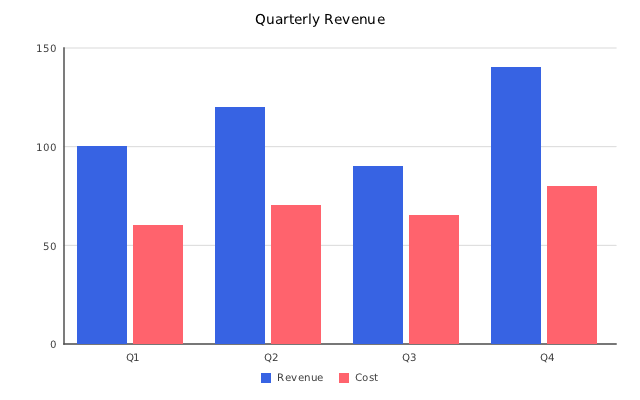 |
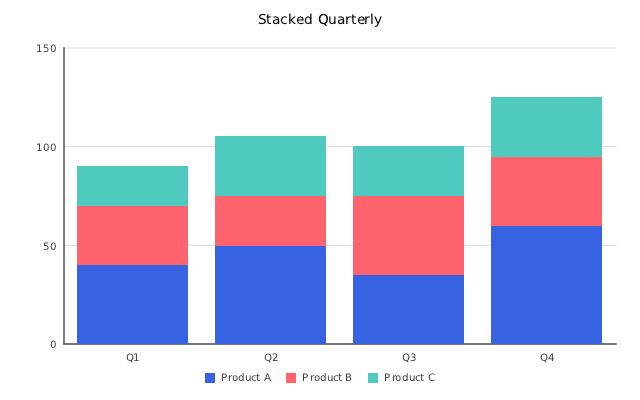 |
Minimal example
#include "insightdock/charts.h"

using namespace insightdock::charts;

BarChart bar;
bar.set_categories({"Q1", "Q2", "Q3", "Q4"});
bar.add_series("Revenue", {100, 120, 90, 140});
bar.add_series("Cost", {60, 70, 65, 80});
ChartExporter::save(bar, "bar.png");
Grouped vs. stacked
bar.set_mode(BarMode::Grouped); // default: series drawn side-by-side per category
bar.set_mode(BarMode::Stacked); // series stack vertically per category
Bar-specific options
bar.bar_options() returns a mutable BarOptions& with everything bar-specific — layout, shape,
and data labels. The old set_mode()/set_group_gap()/set_bar_gap() methods still work as thin
forwarders onto the same struct.
| Field | Default | Purpose |
|---|---|---|
mode |
BarMode::Grouped |
Grouped, Stacked, or Stacked100 (each category normalised to 100%, see below). |
orientation |
BarOrientation::Vertical |
Vertical (default) or Horizontal — see below. |
group_gap |
0.2 |
Gap between category groups, as a fraction of slot width, [0, 0.5]. |
bar_gap |
0.1 |
Gap between bars within a group (grouped mode only), [0, 0.5]. |
corner_radius |
0.0 |
Rounds bar corners, in pixels. 0 = square (default). |
border_color |
transparent | Bar outline color. Transparent (default) draws no border regardless of border_width. |
border_width |
0.0 |
Outline stroke width in pixels. A rounded bar's border is a plain rectangle — it slightly overlaps the rounded corners. |
data_labels |
disabled | DataLabelOptions — draws each bar's formatted value above it (stacked mode: centered in its segment). |
bar.bar_options().corner_radius = 8.0f;
bar.bar_options().border_width = 1.5f;
bar.bar_options().border_color = Color::rgb(30, 90, 180);
bar.bar_options().data_labels.enabled = true;
ComboChart's bar series share this same BarOptions struct via combo.bar_options().
Horizontal orientation
For rankings/leaderboards or category names too long to fit under a vertical x-axis, set
orientation to draw bars extending rightward from a category axis on the left instead of
upward from one at the bottom:
BarChart bar;
bar.bar_options().orientation = BarOrientation::Horizontal;
bar.set_categories({"North America", "Europe", "Asia-Pacific", "Latin America", "Africa"});
bar.add_series("Revenue", {320, 280, 410, 150, 95});
The left margin widens automatically to fit the longest category label. Grouped and stacked modes
both work in horizontal orientation. Not available on ComboChart (its line-series geometry has
no horizontal equivalent).
ReferenceLine/ReferenceBand keep their meaning relative to the axes: Horizontal is a constant
value (so it is drawn as a vertical line here), Vertical is a category position (drawn as a
horizontal line).
100% stacked
bar.set_mode(BarMode::Stacked100);
Every category is normalised so its segments add up to 100%, which shows each series' share
instead of its magnitude. The value axis is fixed at 0–100% and is labelled with %
automatically (set y_tick_format or custom_y_formatter to override). Negative and missing
values count as 0, and a category whose total is not positive is left empty. Data labels still
show the original values. Works in horizontal orientation too.
Shared CartesianOptions
Every CartesianChart subclass (BarChart, LineChart, AreaChart, ComboChart) shares the
same axis options struct, accessed via cartesian_options():
bar.cartesian_options().y_axis_label = "Amount";
bar.cartesian_options().y_tick_format = TickFormat::SI;    // 1500000 → "1.5M"
bar.cartesian_options().begin_at_zero = true;              // default
bar.cartesian_options().max_x_labels = 12;                 // cap dense category axes
bar.cartesian_options().min_y_labels = bar.cartesian_options().max_y_labels = 12; // ~12 y-ticks
See Usage guide → Tick formatting for the full TickFormat
list and custom formatter callbacks, and Concepts for what
min_y_labels/max_y_labels do under the hood.
Log y-axis
y_scale_type = ScaleType::Log switches the primary (left) y-axis to a base-10 logarithmic
mapping with power-of-10 / 1-2-5-mantissa "nice" ticks — for network traffic, latency, or
financial data spanning multiple orders of magnitude, where a linear axis would flatten the low
end into an unreadable line hugging the bottom:
chart.cartesian_options().y_scale_type = ScaleType::Log;
begin_at_zero is ignored when the axis is Log (a log domain can't include zero). Works on
BarChart, LineChart, AreaChart, and ComboChart's primary axis; the secondary (right) axis
stays Linear-only in v1. See examples/log_scale_example.cc.
Continuous DateTime x-axis
LineChart and AreaChart (not BarChart/ComboChart — see below) can position points by real
timestamp instead of an evenly-spaced category slot:
chart.set_x_values({1774137600.0, 1774224000.0, 1774483200.0}); // Unix timestamps, any spacing
chart.cartesian_options().x_scale_type = ScaleType::DateTime;
chart.add_series("Data Consumed", {15.87, 22.43, 44.91});
Irregular gaps in the data render as irregular pixel spacing — a real time axis, not category
labels that happen to look like dates. Axis ticks are generated from the numeric domain and
formatted automatically (YYYY-MM-DD HH:MM). BarChart/ComboChart don't override the hook that
enables this (CartesianChart::supports_continuous_x_axis()), so setting x_scale_type on them
is a no-op — a fixed-width bar-per-category layout has no well-defined meaning for irregularly-
spaced continuous positions. See examples/time_series_line_example.cc.
Reference lines and bands
CartesianOptions::reference_lines/reference_bands draw threshold lines (e.g. an SLA target)
or shaded ranges behind the bars — available on every CartesianChart subclass (BarChart,
LineChart, AreaChart, ComboChart):
ReferenceLine sla;
sla.orientation = ReferenceOrientation::Horizontal; // default
sla.value = 250;               // a y-axis value for Horizontal
sla.color = Color::rgb(200, 40, 40);
sla.dash = {6.0f, 4.0f};       // default; empty vector = solid
sla.label = "SLA (250ms)";
bar.cartesian_options().reference_lines.push_back(sla);
A Vertical line's value is a fractional category index rather than a category label —
category i spans [i, i+1) on that axis, so value = i + 0.5 lands on category i's own
center (its tick-label position) and value = i lands exactly on the boundary between category
i-1 and category i:
ReferenceLine launch;
launch.orientation = ReferenceOrientation::Vertical;
launch.value = 2.5;            // the 3rd category's center (0-indexed)
launch.color = Color::rgb(30, 140, 30);
launch.label = "Launch";
bar.cartesian_options().reference_lines.push_back(launch);
Not available on PieChart/ScatterChart — they have no draw_overlay() hook to attach to. For
anything beyond a straight threshold line/band, draw_overlay is still the extension point — see
Concepts → Extending.