Combo chart
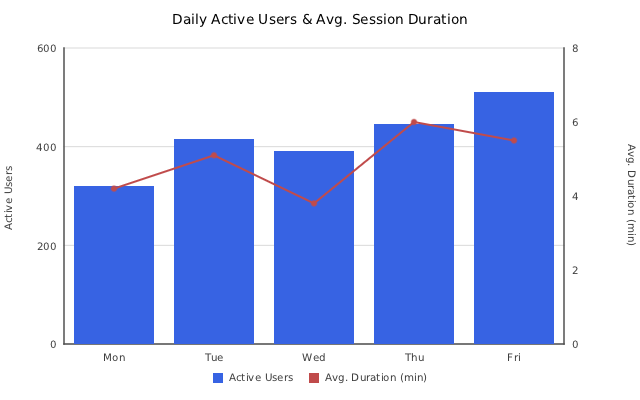
ComboChart (insightdock/combo_chart.h) mixes bar and line series on a shared category axis, with
each series independently opting into the shared left y-axis or an independent right-side y-axis —
for pairing series of different units or magnitude (session count vs. average duration, revenue vs.
margin percent) on one chart without one series flattening the other.
Minimal example
#include "insightdock/charts.h"

using namespace insightdock::charts;

ComboChart combo;
combo.cartesian_options().y_axis_label = "Active Users";
combo.cartesian_options().y2_axis_label = "Avg. Duration (min)";
combo.set_categories({"Mon", "Tue", "Wed", "Thu", "Fri"});
combo.add_bar_series("Active Users", {320, 415, 390, 445, 510});
combo.add_line_series("Avg. Duration (min)", {4.2, 5.1, 3.8, 6.0, 5.5},
                      Color::rgb(192, 75, 75), /*secondary_axis=*/true);
ChartExporter::save(combo, "combo.png");
Adding series
Every series is tagged both by geometry (bar vs. line) and by which axis it scales against:
void add_bar_series(std::string label, std::vector<double> values, bool secondary_axis = false);
void add_bar_series(std::string label, std::vector<double> values, Color color, bool secondary_axis = false);

void add_line_series(std::string label, std::vector<double> values, bool secondary_axis = false);
void add_line_series(std::string label, std::vector<double> values, Color color, bool secondary_axis = false);
secondary_axis defaults to false — a series scales against the shared left axis unless you
explicitly opt it into the right one. There's no restriction tying axis choice to series kind: bars
can go on the right axis and lines on the left if that fits your data better.
ComboLineOptions
Applies to every line series in the chart (accessed via combo.line_options()):
| Option | Default | Purpose |
|---|---|---|
show_points |
true |
Draw markers at each data point. |
line_width |
2.0 |
Stroke width in pixels. |
point_radius |
3.0 |
Point marker radius in pixels. |
spline |
false |
Catmull-Rom cubic interpolation for the line series. |
dash |
empty (solid) | Alternating on/off stroke lengths in pixels, e.g. {6, 4}. Override per series via the add_line_series(label, values, color, SeriesStyle, secondary_axis) overload. |
gap_policy |
GapPolicy::Gap |
How NaN/Inf/missing values are drawn in line series. |
point_shape |
PointMarkerShape::Circle |
Circle, Square, Triangle, or Cross. |
data_labels |
disabled | DataLabelOptions for the line series' points. |
The bar series share BarChart's BarOptions struct via combo.bar_options() — rounded corners,
border, group_gap/bar_gap spacing, and data_labels all work the same way; see
Bar → Bar-specific options. The old set_group_gap(float) method
still works as a forwarder onto bar_options().group_gap.
Dual-axis labeling and tick format
The secondary axis has its own label and tick-format fields on CartesianOptions, mirroring the
primary axis:
combo.cartesian_options().y2_axis_label = "Avg. Duration (min)";
combo.cartesian_options().y2_tick_format = TickFormat::Raw;
combo.cartesian_options().custom_y2_formatter = [](double v) {
  char buf[32];
  std::snprintf(buf, sizeof(buf), "%.1f min", v);
  return std::string(buf);
};
The right margin widens automatically to fit the secondary axis's tick labels — no manual layout adjustment needed when you enable it.
The primary (left) axis can also be switched to a logarithmic scale via
cartesian_options().y_scale_type = ScaleType::Log (see
Bar → Log y-axis) for series spanning multiple orders of magnitude — the
secondary (right) axis stays Linear-only in v1, so pair a log-scale primary series with a
linear-scale secondary one deliberately, not as an oversight.
Reference lines and bands
cartesian_options().reference_lines/reference_bands work here too — drawn at the start of the
combo's draw_overlay(), so they sit behind the line series but the bars (drawn earlier, in
draw_series) sit behind the reference lines. See
Bar → Reference lines and bands.
How this is implemented
If you're building a new chart type that needs a second axis or a second drawing pass, ComboChart
is the reference implementation to read: bars are drawn in the ordinary draw_series override, and
the line-series pass runs in draw_overlay — the same generic extension hook documented in
Concepts → Extending — rather than a
combo-specific pipeline. The dual-axis machinery (has_secondary_y_axis(), compute_y2_min(),
compute_y2_max(), PlotContext::y_scale2) is generic on CartesianChart too, so any subclass can
opt into a secondary axis the same way later.