Area chart
AreaChart (insightdock/area_chart.h) draws filled polygons from series values down to the
baseline, with an optional stacked mode — the tool for cumulative/composition-over-category views
that LineChart's single-series fill_area isn't meant to cover.
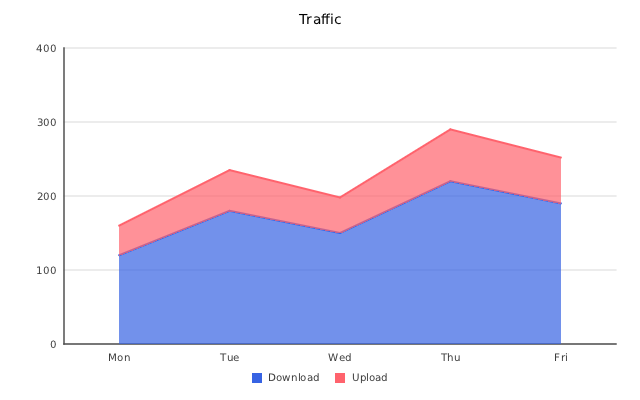
Minimal example
#include "insightdock/charts.h"

using namespace insightdock::charts;

AreaChart area;
area.set_categories({"Mon", "Tue", "Wed", "Thu", "Fri"});
area.add_series("Download", {120, 180, 150, 220, 190});
area.add_series("Upload", {40, 55, 48, 70, 62});
area.area_options().stacked = true;
ChartExporter::save(area, "area.png");
AreaChartOptions
Accessed via area.area_options():
| Option | Default | Purpose |
|---|---|---|
stacked |
false |
Stack series polygons instead of overlapping them. |
stacked_percent |
false |
100%-stacked: every category is normalised to 100% and the axis runs 0–100%. Implies stacking; negative/missing values count as 0. |
step |
StepMode::None |
Staircase edges (After, Before, Middle) instead of straight segments; takes precedence over spline. |
show_line |
true |
Draw a stroke on top of each filled area. |
line_width |
2.0 |
Stroke width in pixels, when show_line is true. |
spline |
false |
Catmull-Rom cubic interpolation for both the fill and the stroke edge. |
dash |
empty (solid) | Alternating on/off stroke lengths in pixels for the top edge. Chart-wide default; override per series with SeriesStyle (see Line → Per-series style). |
gap_policy |
GapPolicy::Gap |
How NaN/Inf/missing values are drawn in non-stacked areas. In stacked mode a missing value counts as 0. |
show_points |
false |
Point markers along the top edge — off by default, unlike LineChart. |
point_radius |
4.0 |
Marker radius when show_points is true. |
point_shape |
PointMarkerShape::Circle |
Circle, Square, Triangle, or Cross. |
data_labels |
disabled | DataLabelOptions — draws each point's formatted value above the top edge. |
With stacked = false (the default), each series' polygon is drawn independently down to the
baseline and series will visually overlap where their fills' alpha lets the one below show through
— appropriate for comparing a small number of overlapping trends. With stacked = true, each
series is drawn on top of the running total of the ones before it, so the top edge of the topmost
polygon represents the sum across all series at each category — appropriate for
part-to-whole-over-time views (bandwidth by protocol, revenue by product line, etc.).
Shared axis options
AreaChart is a CartesianChart subclass, so cartesian_options() (tick format, axis labels,
label density) works exactly as documented in
Bar → Shared CartesianOptions, and
reference_lines/reference_bands work as documented in
Bar → Reference lines and bands.
Like LineChart, AreaChart also supports a logarithmic y-axis
(Bar → Log y-axis) and a continuous DateTime x-axis positioned by real
timestamp via set_x_values() (Bar → Continuous DateTime x-axis).