Scatter & bubble chart
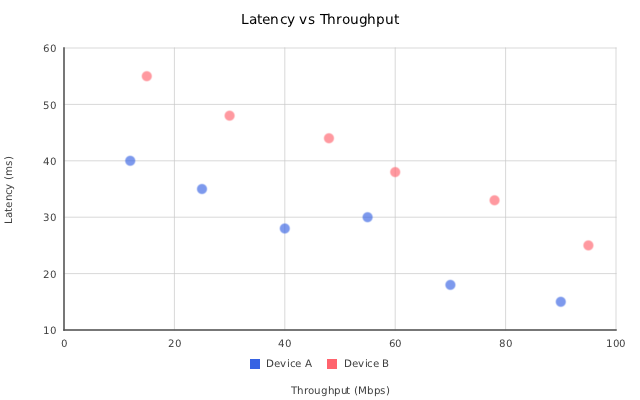
ScatterChart (insightdock/scatter_chart.h) plots continuous numeric x/y points — unlike every
other chart type in the library, its x-axis is not a category list, so points need not be evenly
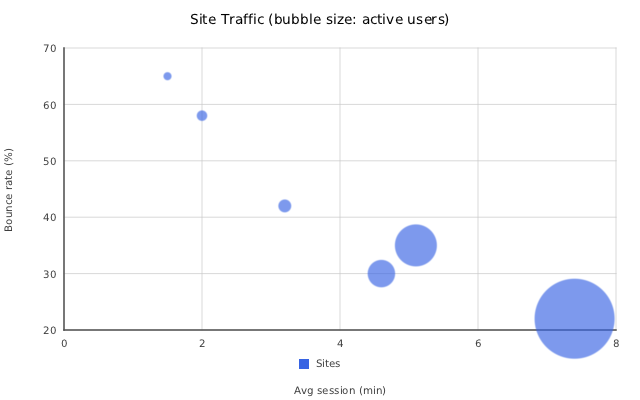
spaced or sorted. Setting a point's radius turns it into a bubble marker, sized relative to the
other bubble points in the chart.
| Scatter | Bubble |
|---|---|
 |
 |
Minimal example (plain scatter)
#include "insightdock/charts.h"

using namespace insightdock::charts;

ScatterChart chart;
chart.scatter_options().x_axis_label = "Throughput (Mbps)";
chart.scatter_options().y_axis_label = "Latency (ms)";
chart.add_series("Device A", {{12, 40}, {25, 35}, {40, 28}, {55, 30}, {70, 18}, {90, 15}});
ChartExporter::save(chart, "scatter.png");
{x, y} braces construct a ScatterPoint{x, y, radius} with radius defaulting to 0 — a plain,
uniformly-sized marker.
Bubble variant
Set a positive third value (radius) on any point to enable bubble sizing for it — the marker
scales between min_bubble_radius and max_bubble_radius based on that value relative to other
bubble points in the chart. Points left at radius 0 always draw at the fixed
ScatterOptions::point_radius:
ScatterChart bubble;
bubble.scatter_options().x_axis_label = "Avg session (min)";
bubble.scatter_options().y_axis_label = "Bounce rate (%)";
bubble.add_series("Sites", {
    {3.2, 42, 120},  // {x, y, radius} — radius drives bubble size
    {5.1, 35, 480},
    {2.0, 58, 90},
    {7.4, 22, 950},
});
ChartExporter::save(bubble, "bubble.png");
ScatterOptions
Accessed via chart.scatter_options():
| Option | Default | Purpose |
|---|---|---|
x_axis_label |
empty | Label below the x-axis. |
y_axis_label |
empty | Label beside the y-axis. |
begin_at_zero_x |
false |
Force the x-axis minimum to 0. |
begin_at_zero_y |
false |
Force the y-axis minimum to 0. |
point_radius |
5.0 |
Marker radius (pixels) for points with radius == 0. |
min_bubble_radius |
4.0 |
Smallest rendered bubble radius, pixels. |
max_bubble_radius |
40.0 |
Largest rendered bubble radius, pixels. |
fill_opacity |
0.65 |
Marker fill alpha, 0–1. |
point_shape |
PointMarkerShape::Circle |
Circle, Square, Triangle, or Cross. Applies to every point — no per-point override. |
data_labels |
disabled | DataLabelOptions — labels each point with its formatted Y value (no per-point custom label in v1). |
ScatterChart has no draw_overlay() hook, so it doesn't support ReferenceLine/ReferenceBand —
those are CartesianChart-only (see Bar → Reference lines and bands).
Why not CartesianChart?
ScatterChart derives directly from Chart, not CartesianChart — both axes are continuous
numeric Scales over the data domain rather than a fixed category list, so the category-axis
machinery CartesianChart provides (and that BarChart/LineChart/AreaChart/ComboChart share)
doesn't apply here. See Concepts → Class hierarchy for the full
reasoning if you're deciding which base to use for a new chart type.