Line chart
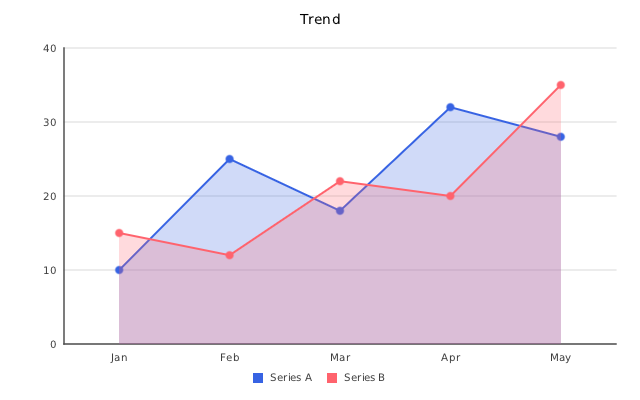
LineChart (insightdock/line_chart.h) draws multi-series lines with optional point markers and
area fill, built on the shared CartesianChart axis/grid/legend pipeline.
Minimal example
#include "insightdock/charts.h"

using namespace insightdock::charts;

LineChart line;
line.set_categories({"Jan", "Feb", "Mar", "Apr", "May"});
line.add_series("Series A", {10, 25, 18, 32, 28});
line.add_series("Series B", {15, 12, 22, 20, 35});
line.line_options().fill_area = true;
ChartExporter::save(line, "line.png");
LineChartOptions
Accessed via line.line_options() (mutable reference, so set fields directly):
| Option | Default | Purpose |
|---|---|---|
show_points |
true |
Draw markers at each data point. |
fill_area |
false |
Fill the area under the line (first series only). |
line_width |
2.0 |
Stroke width in pixels. |
point_radius |
4.0 |
Point marker radius in pixels. |
spline |
false |
Catmull-Rom cubic interpolation between points instead of straight segments. |
step |
StepMode::None |
Staircase instead of straight segments: After (hold, then jump), Before (jump, then hold) or Middle. Takes precedence over spline. Markers stay on the data points. |
dash |
empty (solid) | Alternating on/off stroke lengths in pixels, e.g. {6, 4}. Chart-wide default; override per series with SeriesStyle. |
point_shape |
PointMarkerShape::Circle |
Circle, Square, Triangle, or Cross. Chart-wide default; override per series. |
gap_policy |
GapPolicy::Gap |
How NaN/Inf/missing values are drawn: Gap breaks the line, Interpolate joins the neighbours, Zero plots 0. |
data_labels |
disabled | DataLabelOptions — draws each point's formatted value above it. |
fill_area only fills under the first added series — if you need every series filled and
stacked, use AreaChart instead, which is built for exactly that.
line.line_options().spline = true;
line.line_options().dash = {8.0f, 4.0f};
line.line_options().point_shape = PointMarkerShape::Triangle;
Per-series style
dash, point_shape, line_width and fill opacity are chart-wide defaults. Override any of them
for one series with a SeriesStyle — unset fields keep inheriting the chart-wide value:
SeriesStyle forecast;
forecast.dash = DashPattern{6.0f, 4.0f};
forecast.marker = PointMarkerShape::Square;
line.add_series("Forecast", {14, 16, 19}, Color::rgb(220, 90, 40), forecast);
line.add_series("Actual", {10, 12, 15});   // unchanged: solid, circle markers
A series with a dash or marker override gets a matching line sample in the legend instead of a
filled square. spline and gap_policy stay chart-wide.
Missing data
A NaN, ±Inf, or a series shorter than the category list is "missing". By default
(GapPolicy::Gap) the line breaks there; markers and data labels skip the missing point. Use
GapPolicy::Interpolate to connect across it or GapPolicy::Zero for the pre-1.0 behaviour.
Non-finite values never affect the axis range.
Reference lines and bands
cartesian_options().reference_lines/reference_bands work the same way here as on BarChart —
see Bar → Reference lines and bands.
Dense / time-series data
For a line with many data points (daily data over months, for example), three tools keep the chart readable without changing the underlying data:
lttb_decimate_indexed()(insightdock/decimate.h) reduces point count before rendering, preserving the visual shape (peaks/valleys) using the largest-triangle-three-buckets algorithm.set_x_values()+cartesian_options().x_scale_type = ScaleType::DateTimepositions each point by its real Unix timestamp instead of an evenly-spaced category slot — irregular gaps in the data render as irregular pixel spacing, and axis ticks are generated and formatted automatically from the numeric domain. See Bar → Continuous DateTime x-axis for the full explanation (onlyLineChart/AreaChartsupport it).CartesianOptions::max_x_labelscaps the number of x-axis ticks/labels shown, regardless of chart width — works the same way in both category mode and continuousDateTimemode.
auto [decimated_values, decimated_indices] = lttb_decimate_indexed(daily_values, /*target_points=*/25);
std::vector<double> decimated_timestamps;
for (std::size_t i : decimated_indices)
  decimated_timestamps.push_back(daily_timestamps[i]);

line.set_x_values(decimated_timestamps);
line.add_series("Bandwidth", decimated_values);
line.cartesian_options().x_scale_type = ScaleType::DateTime;
line.cartesian_options().max_x_labels = 12;   // ~12 readable date labels
See examples/time_series_line_example.cc (full source in Examples) for a
complete 100-point-to-25-point walkthrough, and
Bar → Shared CartesianOptions for the equivalent y-axis density
controls (min_y_labels/max_y_labels), which apply here identically.
Date formatting
Continuous DateTime ticks use UTC by default (YYYY-MM-DD HH:MM), independent of the
process timezone. Supply custom_x_formatter for your display format or timezone; the callback
receives the original Unix timestamp:
line.cartesian_options().custom_x_formatter = [](double timestamp) {
  return std::to_string(static_cast<long long>(timestamp)) + " UTC seconds";
};
Raw numeric value ticks preserve fractions and select decimal precision from tick spacing. Invalid/out-of-range timestamps produce an empty default label.